



How do you follow a child throughout the school year, from parent-teacher meeting to support decision?
1
2
3
4
5
6
1
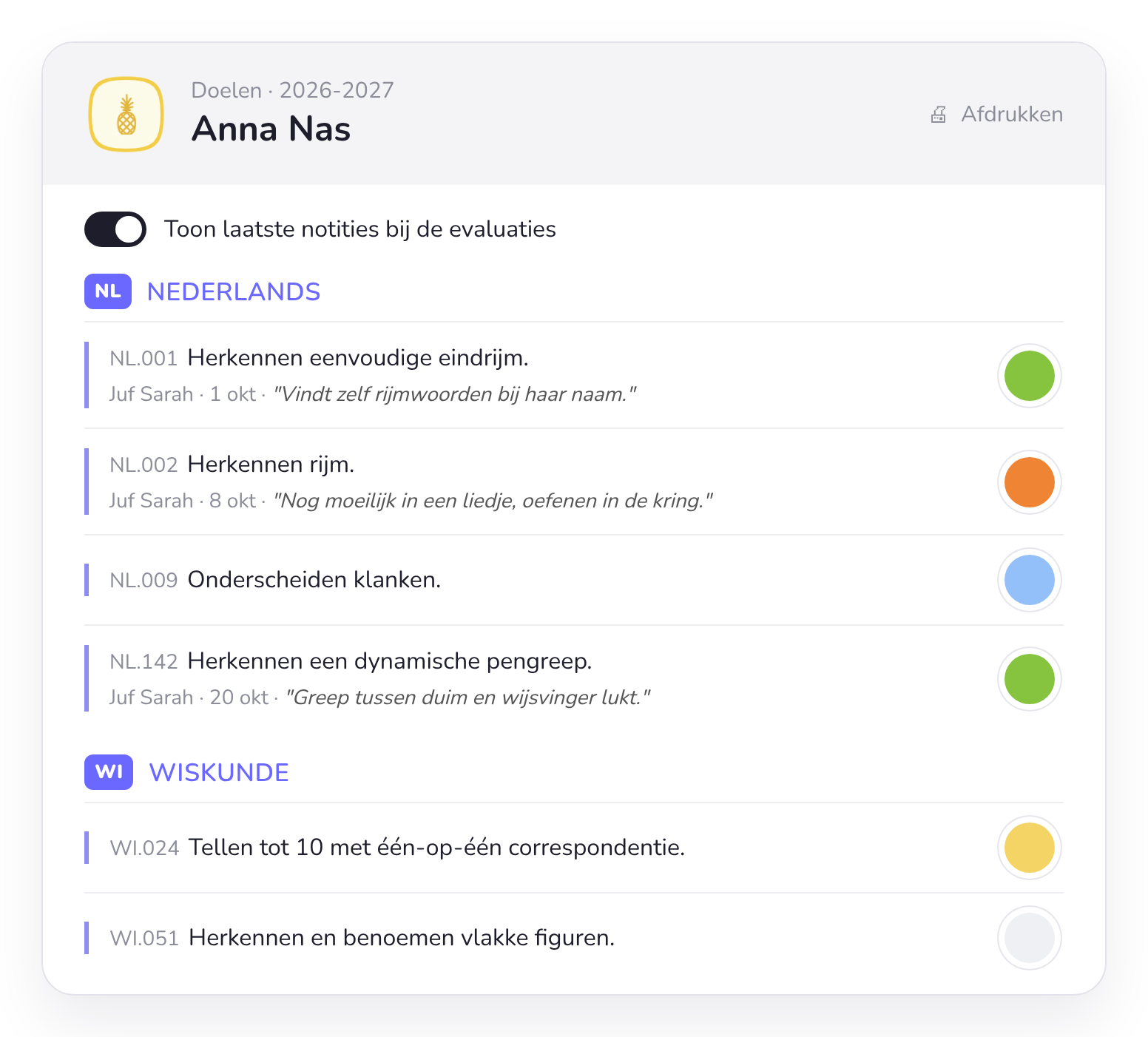
One overview per child, per school year. The file moves along with the child to the next class.
2
Show the latest notes and you immediately see why you assessed a goal the way you did.
3
Who, when and what. Every observation is kept, including those of colleagues.
4
The assessment per goal in one colour: handy for showing parents how their child is growing.
5
Print it or show it on screen. Take the overview with you to the parent-teacher meeting.
6
Filter by domain, such as language or maths, and focus on what you want to discuss.
Per child
What you see for each child
Observations
Everything with the right child
What you record during play goes straight to the right child. Including the photos children take of their own work.
Goals
Goals at a glance
See which goals a child has already reached and where extra attention is needed.
More about goals and curricula →Progress
Growth throughout the school year
Every observation and assessment is linked to an activity, a goal and a moment in time, so you can see how a child develops.
Time spent
What does a child choose?
The digital choice board automatically tracks which activities a child spends time on. You also see preferences and what a child still leaves aside.
To the digital choice board →Parent-teacher meeting
Show parents concrete examples
Browse through each child's photos and observations. Parents see what their child does and learns, instead of only hearing how things are going.
Integration
Linked to Google Drive or OneDrive
Does your school keep pupil records in Google Drive or Microsoft OneDrive? From a child's overview you click straight through to their record in the cloud. Everything at hand, without double work.
Parent-teacher meeting
Your observations and assessments as a guide for the parent-teacher meeting
Everything you record during the year comes with you to the conversation with parents. No loose notes or folders: you show concretely what their child can already do and what you are working on together.
Photos of their work
Browse together through what their child made and did in class.
Assessments per goal
One colour shows what is going well and what still needs practice.
Your own notes
You immediately see why you assessed a goal the way you did.
On screen or on paper
Show the overview on your laptop or print it out.

From tracking to support
Well-founded decisions between general and additional support
Does a child need general support or additional support? Leerpunt, the Flemish centre for education research, recommends basing that decision on data you already collect, and evaluating an action with several sources at several moments. In Smart Symbols, those sources come together for each child: observations with photos, goal assessments and time spent on the digital choice board, each with a date. That is how Smart Symbols supports you with every question in the decision tree.
Question 1
Have you assessed with several sources at several moments?
Observations, photos, goal assessments and choice board data come together for each child, each with a date. You immediately see whether you have enough information or need to assess further first.
Question 2
Does the data show enough progress?
For each child you see which goals have been reached, where extra attention is needed and how the child develops throughout the school year.
Question 3
Do you have a clear enough view of the difficulty?
Look beyond a single test or moment: which activities does a child choose on the choice board, what do they avoid and who do they play with? That way you analyse the learning process before drawing conclusions.
From broad to narrow
Start with your class group
The class profile and the sociogram first show how your whole class plays and learns. Then you zoom in on the child who needs extra attention.
Go to the class profile →Working together
Decide together based on facts
When you meet with the support coordinator or your team, you show concrete observations and photos instead of loose notes and impressions.
Data as a means
More time for the child
A lot of data comes in automatically through the choice board. That way data stays a tool, not extra paperwork.
How to observe during free play →Source (in Dutch): Decabooter, I., Warmoes, A., Pas, M., Struyven, K., Consuegra, E., Willegems, V., & Faddar, J. (2026). Leidraad Data-ondersteund werken binnen de brede basiszorg en verhoogde zorg. Leerpunt.
Read the full guide on leerpunt.be (in Dutch) →
From the classroom
“Our teachers always link their planner to the right goals, which keeps everything clear. We follow what a pupil often chooses and who they play with. And a photo as an observation is taken in no time: ideal for showing development concretely at parent-teacher meetings. Everything comes together in one handy app.”
Maarten Van Hulle
Teacher 4A, GO! De Driesprong – Wijkschool De Rakkertjes
Frequently asked questions about following children
What teachers often ask us about tracking progress and parent-teacher meetings.
Can't find your question?



Ready for your next parent-teacher meeting?
Test Smart Symbols for free with your own class and bring everything for each child together in one place.