



How do you see who children play with, and who often plays alone?
1
2
3
4
5
1
Found under Insights, in the Social interaction tab.
2
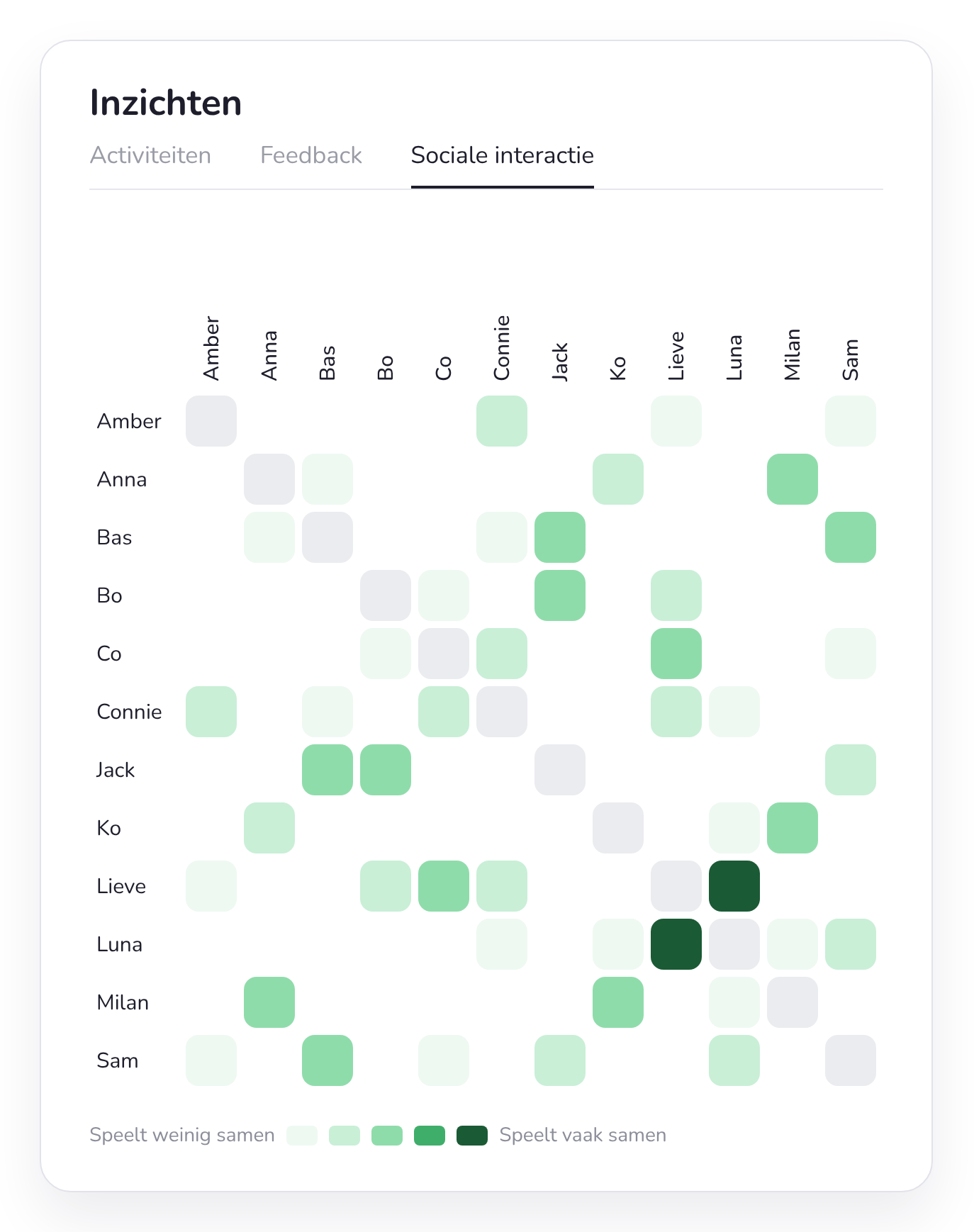
Every child appears in a row and in a column. Where they cross, you see how often those two played together.
3
The darker, the more often together. Lieve and Luna are almost inseparable here.
4
Little colour in a row? That child often plays alone: a good reason for targeted observation.
5
You don't need to keep track of anything. The overview fills itself with who chooses a corner or activity together on the choice board.
The sociogram
How it works
Automatic
Children choose, the app counts
Children choose their learning corner on the choice board. The app tracks which children work on the same activity at the same time.
Naar het digitale keuzebord →Overview
One square per pair
Every child appears in a row and a column. The darker the square, the longer those two children played together.
Up to date
The last 30 days
The overview shows the past 30 days, so you also see changes, for example after a new theme or when a new child joins the class.
Put it to use
What do you do with it?
Does a child often play alone, or always with the same friend? Use it as a reason for targeted observation or to put groups together deliberately.
Tip
Watch for yourself too
The overview shows who plays together, not how. Combine it with your own observations to see the full story.
How to observe during free play →Read more
The full class profile
Also see how your class spends its time across learning corners and activities.
Go to the class profile →
From the classroom
“As a support coordinator, Smart Symbols helps me look beyond individual observations. The data reveals patterns in play, interests and social contacts, so we can better match support and guidance to what a child really needs.”
Isabelle Vandewalle
Educational ICT coordinator, GBS Nest Kuurne
Frequently asked questions about social interactions
What teachers often ask us about the sociogram.
Can't find your question?



See who plays with whom in your class
Test Smart Symbols for free. The sociogram fills itself as your children use the choice board.