



How do you plan a (theme) week around your goals, without starting from scratch every week?
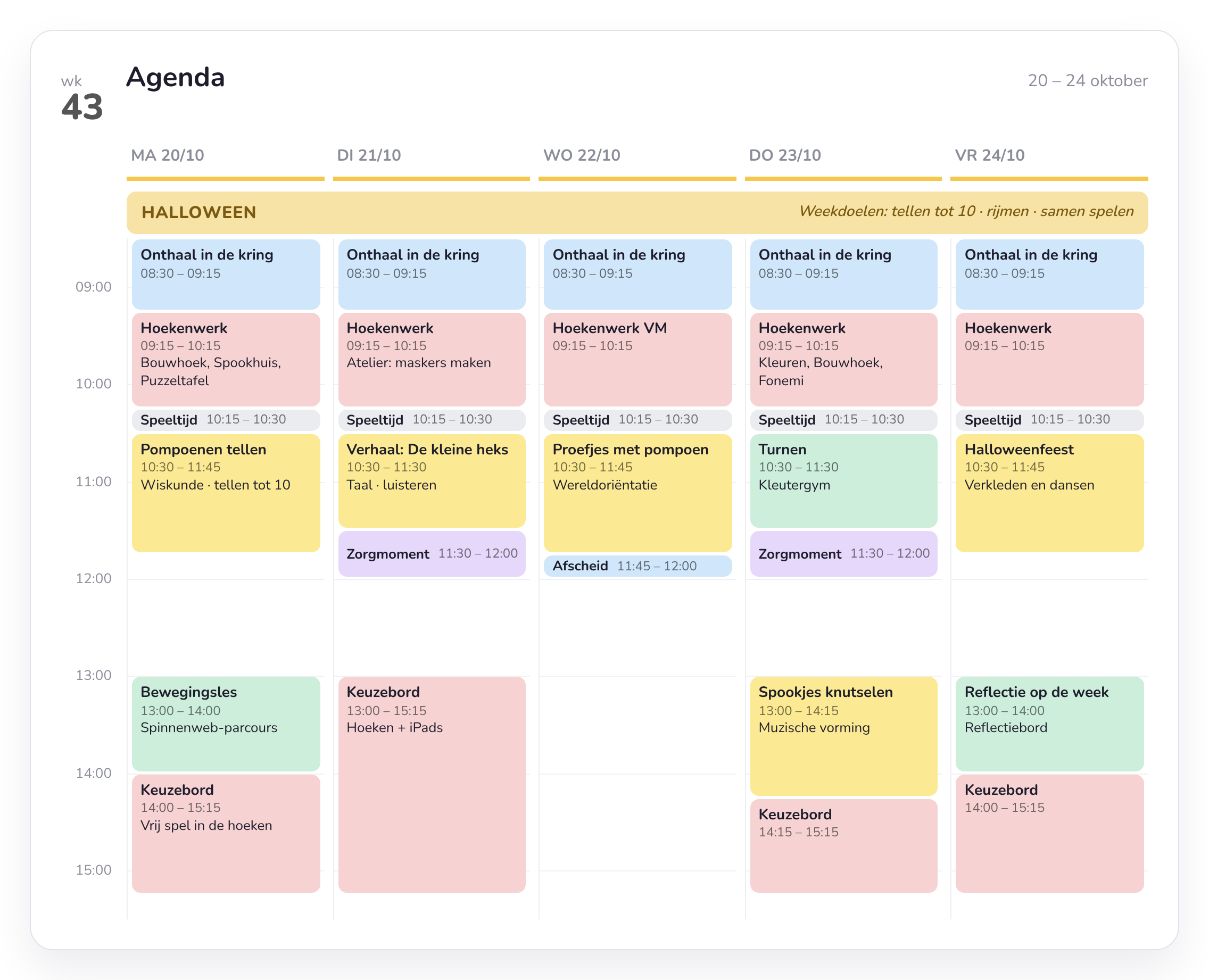

Copy a successful plan to another day or week in just a few clicks.
In 4 steps
How to plan a (theme) week
Step 1
Set up your timetable
Fixed moments such as circle time, whole-class activities or PE are in your timetable, in the same place every day.
Step 2
Choose your weekly theme and goals
Add the theme and goals at the top of your week. Later you can find a week again by searching for the theme.
Step 3
Get inspiration from the library
Choose lesson plans from colleagues in your school or from educational publishers, and save them in your own library.
To lesson plans and library →Step 4
Link activities to goals
Link goals to your (theme) weeks, lesson plans and activities. Later you see per child which goals were covered.
More about goals and curricula →Did a week work well? Copy it to another week and adjust what's needed.
Want to observe around the same goals? How to observe during activities →
From the classroom
“The school inspectorate was extremely positive about our work with Smart Symbols: the content, the goal-oriented approach, the lighter planning load and the ease of use. That gives us as a school real energy to keep growing.”
Nathalie Knevels
Principal, GBS De Negensprong
Frequently asked questions
Frequently asked questions about planning
Which lesson plans are in the library?
Lesson plans from colleagues in your school and from educational publishers and organisations. Whatever you want to use, you save in your own library.
Can I also create my own lesson plans?
Yes. You create your own lesson plans, and colleagues in your school can find them in the library.
Can I reuse a week?
Yes. You copy a complete week and paste it into another week. Then you adjust what you need.
How do I work with goals?
You set yearly goals and link goals to your (theme) weeks, lesson plans and activities.
Is the planner included in every package?
Lite has a basic planner. Essential gives you the full planner and lesson plans.
Can't find your question?
Feel free to get in touch. We are happy to show you how planning in Smart Symbols works in a short demo.



Plan your next theme in Smart Symbols
Try Smart Symbols for free and set up your first (theme) week.