
Why a digital choice board works for young children: tips
Teacher Chloë switched to a digital choice board and immediately saw the atmosphere in her class change. Her experiences and practical tips for a calmer free play time.

The moment free play starts: a group of enthusiastic children crowd around the physical planning board. There is pushing, magnets fall on the floor and there is always that one pupil who has secretly moved their name to the building corner.
In preschool education, up to 50% of class time goes to activities offered through a choice board. Yet the traditional choice board is often more a source of unrest than a help. As a teacher, you lose precious time putting out fires and fixing the board, instead of getting started right away with guiding or observing.
Teacher Chloë of the Prins Willem van Oranjeschool decided to do things differently. She switched to a digital choice board and immediately saw the atmosphere in her class change. In this article we share her experiences and practical steps to create more calm during free play yourself.
Practical steps for free play
Want more independence in your class too? Chloë uses this approach:
- High visibility: the board on the interactive whiteboard can be seen from every corner of the classroom.
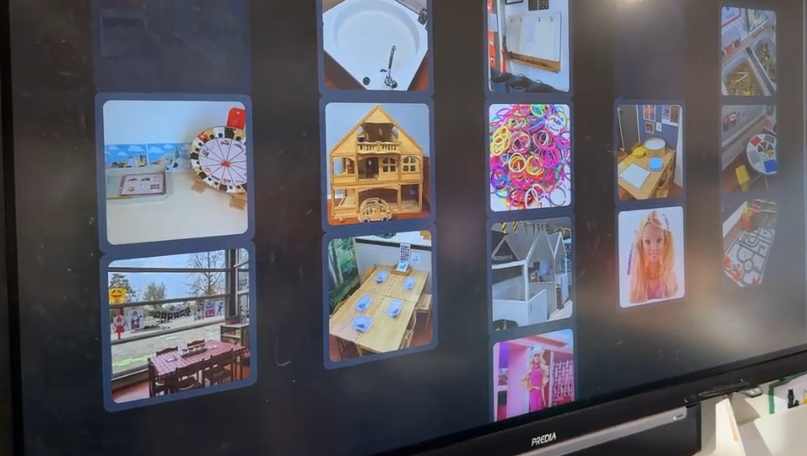
- Theme-based photos: quickly take photos of new materials with your phone and add them to the choices straight away.
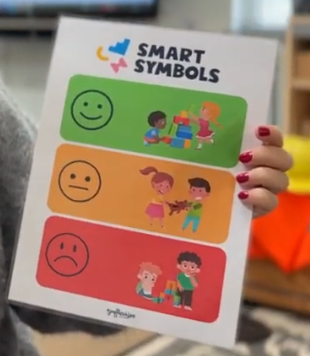
- Visual evaluation: hang a card with smileys (green, orange, red) next to the board, so children can assess their own play.
- Clear switching rules: set a limit, such as switching corners no more than twice, to keep the focus.
- Clear tasks: children see at a glance whether they have a free choice or have been assigned a compulsory task.
- Assign in advance: assign some children to a compulsory task beforehand, so they know exactly where to go when they come in.

"The teacher sees everything"
It used to be hard to check who had really played in the building corner. Now the children in Chloë's class look at the board with a wink: "Aha, the teacher really can follow everything." Because Chloë can see afterwards who played where and how the evaluation went, the children stick to the agreements better. That doesn't create a police atmosphere, but rather safety and clarity.
Insights from teacher Chloë
Chloë noticed a difference straight after the switch:
"It brings an enormous amount of calm. Instead of crowding around a small board, the overview now hangs large in the middle of the classroom."
Her golden tip: use photos of the real materials in your corners. "Because you can quickly take a photo with your phone and add it, the board is up to date every week or with every new theme." That makes the step from the screen to the physical corner very concrete for young children.
The smart solution: how Smart Symbols helps
Smart Symbols was developed to reduce teachers' planning load. It replaces the daily hassle with lost magnets with a simple, digital system that works like an "extra pair of eyes" in the classroom.
- Accessible to everyone: you don't need a thick manual; even less tech-savvy colleagues can get started right away.
- Copy function: plan your week and copy it to the next week with one click.
- Choosing independently: after some guidance at the start of the year, children get to work completely independently.
- Data for the teacher: afterwards you see exactly who played with whom and whether corners were challenging enough. No more paper administration, but digital insights.
- Objective insights: see patterns in your pupils' choices and discover which corners need an extra challenge.
- Tailored evaluation: with the smiley function (green, orange, red) children evaluate their own play.
What does this mean for your class?
Free play is the heart of your preschool classroom, but organising it shouldn't drain your energy. A digital choice board is more than technology: it is a way to bring calm and ownership back into the classroom. As Chloë puts it:
"I just have to open the board and they happily get to work."
Would you like to experience how a digital choice board changes your class? Start a free trial and discover how your children respond to a digital choice board.